
 代码分割
代码分割
# 1. 意义
对于大的Web应用来讲,将所有的代码都放在一个文件中显然是不够有效的,特别是当你的某些代码块是在某些特殊的时候才会被用到,webpack有一个功能就是将你的代码库分割成chunks语块,当代码运行到需要它们的时候再进行加载。webpack的代码分割有三种形式:入口点分割,动态导入和懒加载,提取公共代码。接下来详细介绍这三种分割代码的使用方法。
# 2. 入口点分割
- Entry Points:入口文件设置的时候可以配置
- 这种方法的问题
- 如果入口 chunks 之间包含重复的模块(lodash),那些重复模块都会被引入到各个 bundle 中
- 不够灵活,并且不能将核心应用程序逻辑进行动态拆分代码
{
  entry: {
   page1: "./src/page1.js",
   page2: "./src/page2.js"
  }
}
1
2
3
4
5
6
2
3
4
5
6
# 3 动态导入和懒加载
- 用户当前需要用什么功能就只加载这个功能对应的代码,也就是所谓的按需加载 在给单页应用做按需加载优化时
- 一般采用以下原则:
- 对网站功能进行划分,每一类一个chunk
- 对于首次打开页面需要的功能直接加载,尽快展示给用户,某些依赖大量代码的功能点可以按需加载
- 被分割出去的代码需要一个按需加载的时机
# 3.1 hello.js
hello.js
module.exports = "hello";
1
index.js
document.querySelector('#clickBtn').addEventListener('click',() => {
    import('./hello').then(result => {
        console.log(result.default);
    });
});
1
2
3
4
5
2
3
4
5
index.html
<button id="clickBtn">点我</button>
1
# 3.2 preload(预先加载)
- preload通常用于本页面要用到的关键资源,包括关键js、字体、css文件
- preload将会把资源得下载顺序权重提高,使得关键数据提前下载好,优化页面打开速度
- 在资源上添加预先加载的注释,你指明该模块需要立即被使用
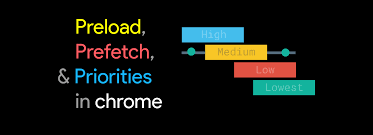
- 一个资源的加载的优先级被分为五个级别,分别是
- Highest 最高
- High 高
- Medium 中等
- Low 低
- Lowest 最低
- 异步/延迟/插入的脚本(无论在什么位置)在网络优先级中是
Low - @vue/preload-webpack-plugin (opens new window)
- preload-webpack-plugin npm (opens new window)
$ npm install --save-dev @vue/preload-webpack-plugin
1
<link rel="preload" as="script" href="utils.js">
import(
  `./utils.js`
  /* webpackPreload: true */
  /* webpackChunkName: "utils" */
)
1
2
3
4
5
6
2
3
4
5
6
# 3.3 prefetch(预先拉取)
- prefetch 跟 preload 不同,它的作用是告诉浏览器未来可能会使用到的某个资源,浏览器就会在闲时去加载对应的资源,若能预测到用户的行为,比如懒加载,点击到其它页面等则相当于提前预加载了需要的资源
<link rel="prefetch" href="utils.js" as="script">
button.addEventListener('click', () => {
  import(
    `./utils.js`
    /* webpackPrefetch: true */
    /* webpackChunkName: "utils" */
  ).then(result => {
    result.default.log('hello');
  })
});
1
2
3
4
5
6
7
8
9
10
2
3
4
5
6
7
8
9
10
# 3.4 preload vs prefetch
- preload 是告诉浏览器页面必定需要的资源,浏览器一定会加载这些资源
- 而 prefetch 是告诉浏览器页面可能需要的资源,浏览器不一定会加载这些资源
- 所以建议:对于当前页面很有必要的资源使用 preload,对于可能在将来的页面中使用的资源使用 prefetch
<!DOCTYPE html>
<html lang="en">
<head>
    <meta charset="UTF-8">
    <meta name="viewport" content="width=device-width, initial-scale=1.0">
    <title>Document</title>
    <link rel="prefetch" href="prefetch.js?k=1" as="script">
    <link rel="prefetch" href="prefetch.js?k=2" as="script">
    <link rel="prefetch" href="prefetch.js?k=3" as="script">
    <link rel="prefetch" href="prefetch.js?k=4" as="script">
    <link rel="prefetch" href="prefetch.js?k=5" as="script">

</head>
<body>

</body>
<link rel="preload"  href="preload.js" as="script">
</html>
1
2
3
4
5
6
7
8
9
10
11
12
13
14
15
16
17
18
2
3
4
5
6
7
8
9
10
11
12
13
14
15
16
17
18
# 3.5 preload-webpack-plugin.js
plugins\preload-webpack-plugin.js
const HtmlWebpackPlugin = require('html-webpack-plugin');
/**
 * 1.查找当前产出代码块有哪些异步代码块
 * 2.针对每个异步代码块生成一个link标签
 * 3.把生成的link标签插入到结果的HTML文件中
 */
class PreloadWebpackPlugin {
  constructor(options) {
    this.options = options;
  }
  apply(compiler) {
    //<link href="title.js" rel="prefetch"></link><
    compiler.hooks.compilation.tap('PreloadWebpackPlugin', (compilation) => {
      //在准备生成资源标签之前执行
      HtmlWebpackPlugin.getHooks(compilation).beforeAssetTagGeneration.tapAsync(
        'PreloadWebpackPlugin',
        (htmlData, callback) => {
          this.generateLinks(compilation, htmlData, callback);
        }
      );
    });
    compiler.hooks.compilation.tap('PreloadWebpackPlugin', (compilation) => {
      //在准备生成资源标签之前执行
      HtmlWebpackPlugin.getHooks(compilation).alterAssetTags.tap(
        'PreloadWebpackPlugin',
        (htmlData) => {
          const { resourceHints } = this;
          if (resourceHints) {
            htmlData.assetTags.styles = [
              ...resourceHints,
              ...htmlData.assetTags.styles
            ]
          }
          return htmlData;
        }
      );
    });

  }
  generateLinks(compilation, htmlData, callback) {
    const { rel, include } = this.options;
    //本次编译产出的代码块
    let chunks = [...compilation.chunks];
    //如果说包括的是异步的代码块
    if (include === undefined || include === 'asyncChunks') {
      //如果chunk.canBeInitial()为true,说明这是一个入口代码块 main.canBeInitial()
      //过滤一下,只留下异步代码块
      chunks = chunks.filter(chunk => !chunk.canBeInitial());
    }
    let allFiles = chunks.reduce((accumulated, chunk) => {
      return accumulated.add(...chunk.files);
    }, new Set());
    const links = [];
    for (const file of allFiles.values()) {
      links.push({
        tagName: 'link',
        attributes: {
          rel,//preload prefetch
          href: file
        }
      });
    }
    this.resourceHints = links;
    callback()
  }
}

module.exports = PreloadWebpackPlugin;
1
2
3
4
5
6
7
8
9
10
11
12
13
14
15
16
17
18
19
20
21
22
23
24
25
26
27
28
29
30
31
32
33
34
35
36
37
38
39
40
41
42
43
44
45
46
47
48
49
50
51
52
53
54
55
56
57
58
59
60
61
62
63
64
65
66
67
68
2
3
4
5
6
7
8
9
10
11
12
13
14
15
16
17
18
19
20
21
22
23
24
25
26
27
28
29
30
31
32
33
34
35
36
37
38
39
40
41
42
43
44
45
46
47
48
49
50
51
52
53
54
55
56
57
58
59
60
61
62
63
64
65
66
67
68
# 4. 提取公共代码
- split-chunks-plugin (opens new window)
- split-chunks-plugin (opens new window)
- common-chunk-and-vendor-chunk (opens new window)
- 怎么配置单页应用?怎么配置多页应用?
# 4.1 为什么需要提取公共代码
- 大网站有多个页面,每个页面由于采用相同技术栈和样式代码,会包含很多公共代码,如果都包含进来会有问题
- 相同的资源被重复的加载,浪费用户的流量和服务器的成本;
- 每个页面需要加载的资源太大,导致网页首屏加载缓慢,影响用户体验。
- 如果能把公共代码抽离成单独文件进行加载能进行优化,可以减少网络传输流量,降低服务器成本
# 4.2 如何提取
- 基础类库,方便长期缓存
- 页面之间的公用代码
- 各个页面单独生成文件
# 4.3 module chunk bundle
- module:就是js的模块化webpack支持commonJS、ES6等模块化规范,简单来说就是你通过import语句引入的代码
- chunk: chunk是webpack根据功能拆分出来的,包含三种情况
- 你的项目入口(entry)
- 通过import()动态引入的代码
- 通过splitChunks拆分出来的代码
- bundle:bundle是webpack打包之后的各个文件,一般就是和chunk是一对一的关系,bundle就是对chunk进行编译压缩打包等处理之后的产出
# 4.4 splitChunks
- split-chunks-plugin (opens new window)
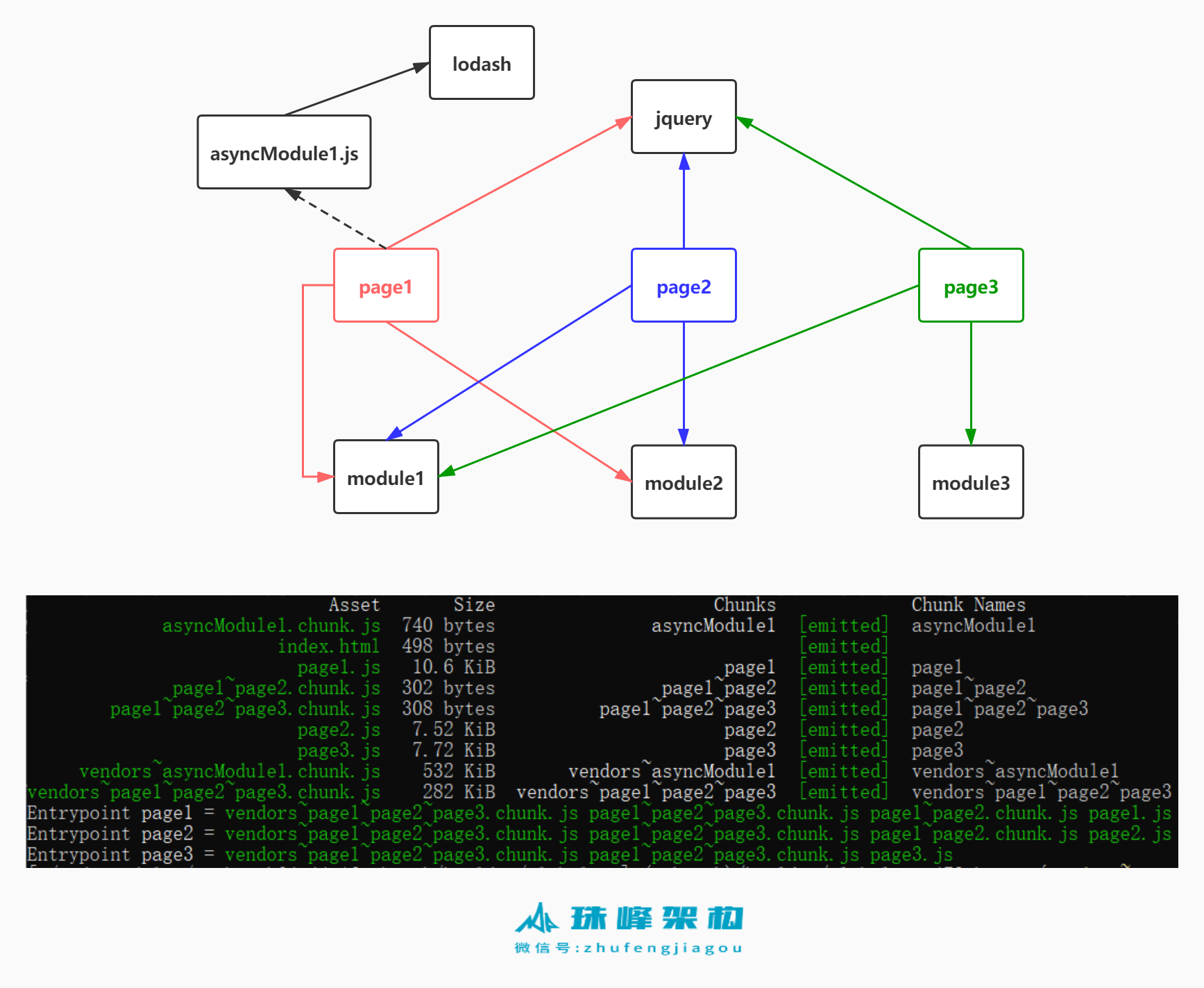
- 将optimization.runtimeChunk (opens new window)设置为 true 或 'multiple',会为每个入口添加一个只含有 runtime 的额外 chunk
# 4.4.1 webpack.config.js
const HtmlWebpackPlugin = require('html-webpack-plugin');
const AssetPlugin = require('./asset-plugin');
module.exports = {
    mode: 'development',
    devtool: false,
    entry: {
        page1: "./src/page1.js",
        page2: "./src/page2.js",
        page3: "./src/page3.js",
    },
    optimization: {
        splitChunks: {
            // 表示选择哪些 chunks 进行分割,可选值有:async,initial和all
            chunks: 'all',
            // 表示新分离出的chunk必须大于等于minSize,默认为30000,约30kb。
            minSize: 0,//默认值是20000,生成的代码块的最小尺寸
            // 表示一个模块至少应被minChunks个chunk所包含才能分割。默认为1。
            minChunks: 1,
            // 表示按需加载文件时,并行请求的最大数目。默认为5。
            maxAsyncRequests: 3,
            // 表示加载入口文件时,并行请求的最大数目。默认为3
            maxInitialRequests: 5,
            // 表示拆分出的chunk的名称连接符。默认为~。如chunk~vendors.js
            automaticNameDelimiter: '~',
            cacheGroups: {
                defaultVendors: {
                    test: /[\\/]node_modules[\\/]/, //条件
                    priority: -10 ///优先级,一个chunk很可能满足多个缓存组,会被抽取到优先级高的缓存组中,为了能够让自定义缓存组有更高的优先级(默认0),默认缓存组的priority属性为负值.
                },
                default: {
                    minChunks: 2,////被多少模块共享,在分割之前模块的被引用次数
                    priority: -20
                },
            },
        },
        runtimeChunk: true
    },
    plugins: [
        new HtmlWebpackPlugin({
            template: './src/index.html',
            chunks: ["page1"],
            filename: 'page1.html'
        }),
        new HtmlWebpackPlugin({
            template: './src/index.html',
            chunks: ["page2"],
            filename: 'page2.html'
        }),
        new HtmlWebpackPlugin({
            template: './src/index.html',
            chunks: ["page3"],
            filename: 'page3.html'
        }),
        new AssetPlugin()
    ]
}
1
2
3
4
5
6
7
8
9
10
11
12
13
14
15
16
17
18
19
20
21
22
23
24
25
26
27
28
29
30
31
32
33
34
35
36
37
38
39
40
41
42
43
44
45
46
47
48
49
50
51
52
53
54
55
56
2
3
4
5
6
7
8
9
10
11
12
13
14
15
16
17
18
19
20
21
22
23
24
25
26
27
28
29
30
31
32
33
34
35
36
37
38
39
40
41
42
43
44
45
46
47
48
49
50
51
52
53
54
55
56
# 4.4.2 webpack-assets-plugin.js
plugins\webpack-assets-plugin.js
class WebpackAssetsPlugin {
  constructor(options) {
    this.options = options;
  }
  apply(compiler) {
    //每当webpack开启一次新的编译 ,就会创建一个新的compilation
    compiler.hooks.compilation.tap('WebpackAssetsPlugin', (compilation) => {
      //每次根据chunk创建一个新的文件后会触发一次chunkAsset
      compilation.hooks.chunkAsset.tap('WebpackAssetsPlugin', (chunk, filename) => {
        console.log(chunk.id, filename);
      });
    });
  }
}
module.exports = WebpackAssetsPlugin;
1
2
3
4
5
6
7
8
9
10
11
12
13
14
15
2
3
4
5
6
7
8
9
10
11
12
13
14
15
# 4.4.3 page1.js
let module1 = require('./module1');
let module2 = require('./module2');
let $ = require('jquery');
console.log(module1,module2,$);
import( /* webpackChunkName: "asyncModule1" */ './asyncModule1');
1
2
3
4
5
2
3
4
5
# 4.4.4 page2.js
let module1 = require('./module1');
let module2 = require('./module2');
let $ = require('jquery');
console.log(module1,module2,$);
1
2
3
4
2
3
4
# 4.4.5 page3.js
let module1 = require('./module1');
let module3 = require('./module3');
let $ = require('jquery');
console.log(module1,module3,$);
1
2
3
4
2
3
4
# 4.4.6 module1.js
module.exports = 'module1';
1
# 4.4.7 module2.js
console.log("module2");
1
# 4.4.8 module3.js
console.log("module3");
1
# 4.4.9 asyncModule1.js
import _ from 'lodash';
console.log(_);
1
2
2
# 4.4.10 打包后的结果
//入口代码块
page1.js
page2.js
page3.js
//异步加载代码块
src_asyncModule1_js.js
//defaultVendors缓存组对应的代码块
defaultVendors-node_modules_jquery_dist_jquery_js.js
defaultVendors-node_modules_lodash_lodash_js.js
//default代缓存组对应的代码块
default-src_module1_js.js
default-src_module2_js.js
1
2
3
4
5
6
7
8
9
10
11
12
2
3
4
5
6
7
8
9
10
11
12
# 4.4.11 计算过程
let page1Chunk= {
    name:'page1',
    modules:['A','B','C','lodash']
}

let page2Chunk = {
    name:'page2',
    module:['C','D','E','lodash']
}

let  cacheGroups= {
    vendor: {
      test: /lodash/,
    },
    default: {
      minChunks: 2,
    }
};

let vendorChunk = {
    name:`vendor~node_modules_lodash_js`,
    modules:['lodash']
}
let defaultChunk = {
    name:`default~page1~page2`,
    modules:['C']
}
1
2
3
4
5
6
7
8
9
10
11
12
13
14
15
16
17
18
19
20
21
22
23
24
25
26
27
2
3
4
5
6
7
8
9
10
11
12
13
14
15
16
17
18
19
20
21
22
23
24
25
26
27
# 4.5 reuseExistingChunk
- reuseExistingChunk (opens new window)表示如果当前的代码包含已经被从主bundle中分割出去的模块,它将会被重用,而不会生成一个新的代码块
# 4.5.1 index.js
1
# 4.5.2 webpack.config.js
const HtmlWebpackPlugin = require('html-webpack-plugin');
const AssetPlugin = require('./asset-plugin');
module.exports = {
    mode: 'development',
    devtool: false,
+   entry: './src/index.js',
    optimization: {
        splitChunks: {
            // 表示选择哪些 chunks 进行分割,可选值有:async,initial和all
            chunks: 'all',
            // 表示新分离出的chunk必须大于等于minSize,默认为30000,约30kb。
            minSize: 0,//默认值是20000,生成的代码块的最小尺寸
            // 表示一个模块至少应被minChunks个chunk所包含才能分割。默认为1。
            minChunks: 1,
            // 表示按需加载文件时,并行请求的最大数目。默认为5。
            maxAsyncRequests: 3,
            // 表示加载入口文件时,并行请求的最大数目。默认为3
            maxInitialRequests: 5,
            // 表示拆分出的chunk的名称连接符。默认为~。如chunk~vendors.js
            automaticNameDelimiter: '~',
+           cacheGroups: {
+               defaultVendors: false,
+               default: false,
+               common: {
+                   minChunks: 1,
+                   reuseExistingChunk: false
+               }
+           }
        },
+       runtimeChunk: false
    },
    plugins: [
        new HtmlWebpackPlugin({
            template: './src/index.html',
            filename: 'index.html'
        })
        new AssetPlugin()
    ]
}
1
2
3
4
5
6
7
8
9
10
11
12
13
14
15
16
17
18
19
20
21
22
23
24
25
26
27
28
29
30
31
32
33
34
35
36
37
38
39
2
3
4
5
6
7
8
9
10
11
12
13
14
15
16
17
18
19
20
21
22
23
24
25
26
27
28
29
30
31
32
33
34
35
36
37
38
39
# 4.5.3 结果
//reuseExistingChunk: false
main main.js
common-src_index_js common-src_index_js.js

//reuseExistingChunk: true
main main.js
1
2
3
4
5
6
2
3
4
5
6
编辑 (opens new window)
上次更新: 2022/05/23, 15:08:15