
 打包优化之loader&plugin
本篇文章演示通过配置loaders和plugins,优化打包速度,合理设置打包输出的资源的数量及大小。将从以下几个方面着手: 提取CSS, 指定图片和CSS目录, 压缩JS、CSS和HTML, 去除未使用的 css, 配置CDN, moduleIds & chunkIds的优化, 模块联邦。下面将逐个介绍他们的用法和注意事项。
# 1. 提取CSS
- 因为CSS的下载和JS可以并行,当一个HTML文件很大的时候,我们可以把CSS单独提取出来加载
# 1.1 安装
npm install mini-css-extract-plugin --save-dev
1
# 1.2 webpack.config.js
webpack.config.js
const path = require('path');
const HtmlWebpackPlugin = require('html-webpack-plugin');
+const MiniCssExtractPlugin = require('mini-css-extract-plugin');
module.exports = {
  mode: 'development',
  devtool: false,
  entry: './src/index.js',
  output: {
    path: path.resolve(__dirname, 'dist'),
    filename: '[name].js',
+    publicPath: '/'
  },
  module: {
    rules: [
      { test: /\.txt$/, use: 'raw-loader' },
+      { test: /\.css$/, use: [MiniCssExtractPlugin.loader, 'css-loader'] },
+      { test: /\.less$/, use: [MiniCssExtractPlugin.loader, 'css-loader', 'less-loader'] },
+      { test: /\.scss$/, use: [MiniCssExtractPlugin.loader, 'css-loader', 'sass-loader'] },
       {
        test: /\.(jpg|png|gif|bmp|svg)$/,
        type:'asset/resource',
        generator:{
          filename:'images/[hash][ext]'
        }
      }
    ]
  },
  plugins: [
    new HtmlWebpackPlugin({ template: './src/index.html' }),
+   new MiniCssExtractPlugin({
+      filename: '[name].css'
+   })
  ]
};
1
2
3
4
5
6
7
8
9
10
11
12
13
14
15
16
17
18
19
20
21
22
23
24
25
26
27
28
29
30
31
32
33
34
2
3
4
5
6
7
8
9
10
11
12
13
14
15
16
17
18
19
20
21
22
23
24
25
26
27
28
29
30
31
32
33
34
# 2 指定图片和CSS目录
# 2.1 webpack.config.js
const path = require('path');
const HtmlWebpackPlugin = require('html-webpack-plugin');
const MiniCssExtractPlugin = require('mini-css-extract-plugin');
module.exports = {
  mode: 'development',
  devtool: false,
  entry: './src/index.js',
  output: {
    path: path.resolve(__dirname, 'dist'),
    filename: '[name].js',
    publicPath: '/'
  },
  module: {
    rules: [
      { test: /\.txt$/, use: 'raw-loader' },
      { test: /\.css$/, use: [MiniCssExtractPlugin.loader, 'css-loader'] },
      { test: /\.less$/, use: [MiniCssExtractPlugin.loader, 'css-loader', 'less-loader'] },
      { test: /\.scss$/, use: [MiniCssExtractPlugin.loader, 'css-loader', 'sass-loader'] },
      {
        test: /\.(jpg|png|gif|bmp|svg)$/,
        type:'asset/resource',
        generator:{
          filename:'images/[hash][ext]'
        }
      }
    ]
  },
  plugins: [
    new HtmlWebpackPlugin({ template: './src/index.html' }),
    new MiniCssExtractPlugin({
+      filename: 'css/[name].css'
    }),
  ]
};
1
2
3
4
5
6
7
8
9
10
11
12
13
14
15
16
17
18
19
20
21
22
23
24
25
26
27
28
29
30
31
32
33
34
2
3
4
5
6
7
8
9
10
11
12
13
14
15
16
17
18
19
20
21
22
23
24
25
26
27
28
29
30
31
32
33
34
# 3. 压缩JS、CSS和HTML
- optimize-css-assets-webpack-plugin (opens new window)是一个优化和压缩CSS资源的插件
- terser-webpack-plugin (opens new window)是一个优化和压缩JS资源的插件
webpack.config.js
const path = require('path');
const HtmlWebpackPlugin = require('html-webpack-plugin');
const MiniCssExtractPlugin = require('mini-css-extract-plugin');
+const OptimizeCssAssetsWebpackPlugin = require('optimize-css-assets-webpack-plugin');
+const TerserPlugin = require('terser-webpack-plugin');

module.exports = {
+  mode: 'none',
  devtool: false,
  entry: './src/index.js',
+  optimization: {
+    minimize: true,
+    minimizer: [
+      new TerserPlugin(),
+    ],
+  },
  output: {
    path: path.resolve(__dirname, 'dist'),
    filename: '[name].js',
    publicPath: '/',
  },
  devServer: {
    contentBase: path.resolve(__dirname, 'dist'),
    compress: true,
    port: 8080,
    open: true,
  },
  module: {
    rules: [
      {
        test: /\.jsx?$/,
        loader: 'eslint-loader',
        enforce: 'pre',
        options: { fix: true },
        exclude: /node_modules/,
      },
      {
        test: /\.jsx?$/,
        use: {
          loader: 'babel-loader',
          options: {
            presets: [[
              '@babel/preset-env',
              {
                useBuiltIns: 'usage'
                corejs: {
                  version: 3
                },
                targets: {
                  chrome: '60',
                  firefox: '60',
                  ie: '9',
                  safari: '10',
                  edge: '17',
                },
              },
            ], '@babel/preset-react'],
            plugins: [
              ['@babel/plugin-proposal-decorators', { legacy: true }],
              ['@babel/plugin-proposal-class-properties', { loose: true }],
            ],
          },
        },
        include: path.join(__dirname, 'src'),
        exclude: /node_modules/,
      },
      { test: /\.txt$/, use: 'raw-loader' },
      { test: /\.css$/, use: [MiniCssExtractPlugin.loader, 'css-loader', 'postcss-loader'] },
      { test: /\.less$/, use: [MiniCssExtractPlugin.loader, 'css-loader', 'postcss-loader', 'less-loader'] },
      { test: /\.scss$/, use: [MiniCssExtractPlugin.loader, 'css-loader', 'postcss-loader', 'sass-loader'] },
      {
        test: /\.(jpg|png|gif|bmp|svg)$/,
        type:'asset/resource',
        generator:{
          filename:'images/[hash][ext]'
        }
      },
      {
        test: /\.html$/,
        loader: 'html-loader',
      },
    ],
  },
  plugins: [
    new HtmlWebpackPlugin({
    template: './src/index.html',
+     minify: {
+        collapseWhitespace: true,
+        removeComments: true
      }
    }),
    new MiniCssExtractPlugin({
      filename: 'css/[name].css',
    }),
+    new OptimizeCssAssetsWebpackPlugin(),
  ],
};
1
2
3
4
5
6
7
8
9
10
11
12
13
14
15
16
17
18
19
20
21
22
23
24
25
26
27
28
29
30
31
32
33
34
35
36
37
38
39
40
41
42
43
44
45
46
47
48
49
50
51
52
53
54
55
56
57
58
59
60
61
62
63
64
65
66
67
68
69
70
71
72
73
74
75
76
77
78
79
80
81
82
83
84
85
86
87
88
89
90
91
92
93
94
95
96
97
2
3
4
5
6
7
8
9
10
11
12
13
14
15
16
17
18
19
20
21
22
23
24
25
26
27
28
29
30
31
32
33
34
35
36
37
38
39
40
41
42
43
44
45
46
47
48
49
50
51
52
53
54
55
56
57
58
59
60
61
62
63
64
65
66
67
68
69
70
71
72
73
74
75
76
77
78
79
80
81
82
83
84
85
86
87
88
89
90
91
92
93
94
95
96
97
# 4. purgecss-webpack-plugin
- purgecss-webpack-plugin (opens new window)
- mini-css-extract-plugin (opens new window)
- purgecss (opens new window)
- 可以去除未使用的 css,一般与 glob、glob-all 配合使用
- 必须和
mini-css-extract-plugin配合使用 paths路径是绝对路径
npm i purgecss-webpack-plugin mini-css-extract-plugin css-loader glob -D
1
webpack.config.js
const path = require("path");
+const glob = require("glob");
+const PurgecssPlugin = require("purgecss-webpack-plugin");
+const MiniCssExtractPlugin = require('mini-css-extract-plugin');
const PATHS = {
  src: path.join(__dirname, 'src')
}
module.exports = {
  mode: "development",
  entry: "./src/index.js",
  module: {
    rules: [
      {
        test: /\.js/,
        include: path.resolve(__dirname, "src"),
        use: [
          {
            loader: "babel-loader",
            options: {
              presets: ["@babel/preset-env", "@babel/preset-react"],
            },
          },
        ],
      },
+      {
+        test: /\.css$/,
+        include: path.resolve(__dirname, "src"),
+        exclude: /node_modules/,
+        use: [
+          {
+            loader: MiniCssExtractPlugin.loader,
+          },
+          "css-loader",
+        ],
+      },
    ],
  },
  plugins: [
+    new MiniCssExtractPlugin({
+      filename: "[name].css",
+    }),
+    new PurgecssPlugin({
+      paths: glob.sync(`${PATHS.src}/**/*`,  { nodir: true }),
+    })
  ],
};
1
2
3
4
5
6
7
8
9
10
11
12
13
14
15
16
17
18
19
20
21
22
23
24
25
26
27
28
29
30
31
32
33
34
35
36
37
38
39
40
41
42
43
44
45
46
2
3
4
5
6
7
8
9
10
11
12
13
14
15
16
17
18
19
20
21
22
23
24
25
26
27
28
29
30
31
32
33
34
35
36
37
38
39
40
41
42
43
44
45
46
style.css
#root{
    color: red;
}
#logo{
    color:green
}
1
2
3
4
5
6
2
3
4
5
6
# 5. CDN
- qiniu (opens new window)
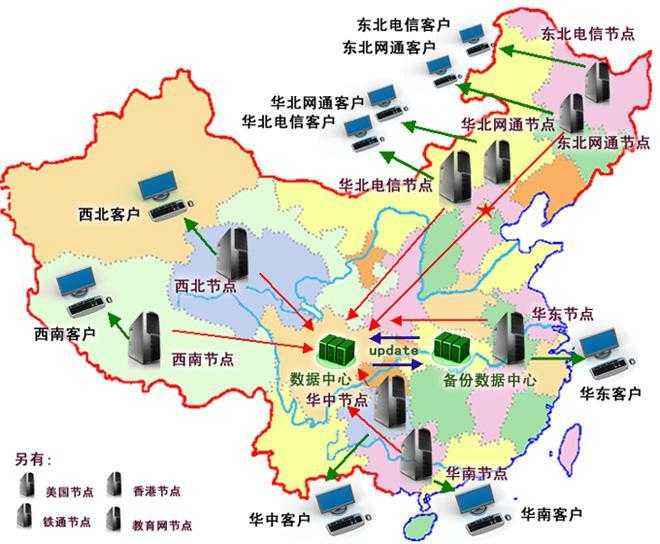
- CDN 又叫内容分发网络,通过把资源部署到世界各地,用户在访问时按照就近原则从离用户最近的服务器获取资源,从而加速资源的获取速度。
- public-path (opens new window)
- external-remotes-plugin (opens new window)
# 5.1 使用缓存
- HTML文件不缓存,放在自己的服务器上,关闭自己服务器的缓存,静态资源的URL变成指向CDN服务器的地址
- 静态的JavaScript、CSS、图片等文件开启CDN和缓存,并且文件名带上HASH值
- 为了并行加载不阻塞,把不同的静态资源分配到不同的CDN服务器上
# 5.2 域名限制
- 同一时刻针对同一个域名的资源并行请求是有限制
- 可以把这些静态资源分散到不同的 CDN 服务上去
- 多个域名后会增加域名解析时间
- 可以通过在 HTML HEAD 标签中 加入
<link rel="dns-prefetch" href="http://img.xujian.site">去预解析域名,以降低域名解析带来的延迟
# 5.3 文件指纹
- 打包后输出的文件名和后缀
- hash一般是结合CDN缓存来使用,通过webpack构建之后,生成对应文件名自动带上对应的MD5值。如果文件内容改变的话,那么对应文件哈希值也会改变,对应的HTML引用的URL地址也会改变,触发CDN服务器从源服务器上拉取对应数据,进而更新本地缓存。
指纹占位符
| 占位符名称 | 含义 |
|---|---|
| ext | 资源后缀名 |
| name | 文件名称 |
| path | 文件的相对路径 |
| folder | 文件所在的文件夹 |
| hash | 每次webpack构建时生成一个唯一的hash值 |
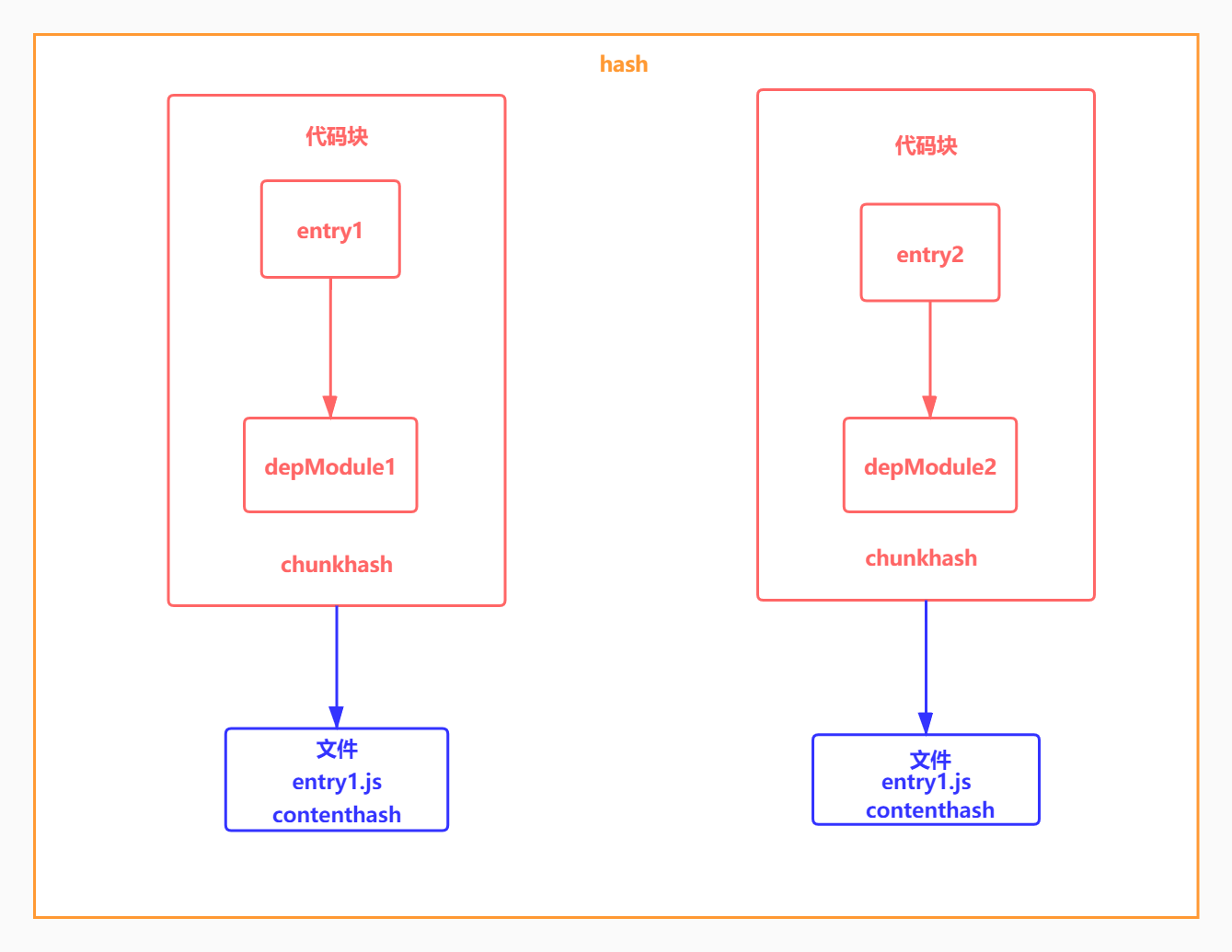
| chunkhash | 根据chunk生成hash值,来源于同一个chunk,则hash值就一样 |
| contenthash | 根据内容生成hash值,文件内容相同hash值就相同 |
# 5.3.1 hash
- Hash 是整个项目的hash值,其根据每次编译内容计算得到,每次编译之后都会生成新的hash,即修改任何文件都会导致所有文件的hash发生改变
const path = require("path");
const glob = require("glob");
const PurgecssPlugin = require("purgecss-webpack-plugin");
const MiniCssExtractPlugin = require('mini-css-extract-plugin');
const PATHS = {
  src: path.join(__dirname, 'src')
}
module.exports = {
  mode: "production",
+  entry: {
+    main: './src/index.js',
+    vender:['lodash']
+  },
  output:{
    path:path.resolve(__dirname,'dist'),
+    filename:'[name].[hash].js'
  },
  devServer:{
    hot:false
  },
  module: {
    rules: [
      {
        test: /\.js/,
        include: path.resolve(__dirname, "src"),
        use: [
          {
            loader:'thread-loader',
            options:{
              workers:3
            }
          },
          {
            loader: "babel-loader",
            options: {
              presets: ["@babel/preset-env", "@babel/preset-react"],
            },
          },
        ],
      },
      {
        test: /\.css$/,
        include: path.resolve(__dirname, "src"),
        exclude: /node_modules/,
        use: [
          {
            loader: MiniCssExtractPlugin.loader,
          },
          "css-loader",
        ],
      },
    ],
  },
  plugins: [
    new MiniCssExtractPlugin({
+      filename: "[name].[hash].css"
    }),
    new PurgecssPlugin({
      paths: glob.sync(`${PATHS.src}/**/*`,  { nodir: true }),
    }),
  ],
};
1
2
3
4
5
6
7
8
9
10
11
12
13
14
15
16
17
18
19
20
21
22
23
24
25
26
27
28
29
30
31
32
33
34
35
36
37
38
39
40
41
42
43
44
45
46
47
48
49
50
51
52
53
54
55
56
57
58
59
60
61
62
2
3
4
5
6
7
8
9
10
11
12
13
14
15
16
17
18
19
20
21
22
23
24
25
26
27
28
29
30
31
32
33
34
35
36
37
38
39
40
41
42
43
44
45
46
47
48
49
50
51
52
53
54
55
56
57
58
59
60
61
62
# 5.3.2 chunkhash
- chunkhash 采用hash计算的话,每一次构建后生成的哈希值都不一样,即使文件内容压根没有改变。这样子是没办法实现缓存效果,我们需要换另一种哈希值计算方式,即chunkhash,chunkhash和hash不一样,它根据不同的入口文件(Entry)进行依赖文件解析、构建对应的chunk,生成对应的哈希值。我们在生产环境里把一些公共库和程序入口文件区分开,单独打包构建,接着我们采用chunkhash的方式生成哈希值,那么只要我们不改动公共库的代码,就可以保证其哈希值不会受影响
const path = require("path");
const glob = require("glob");
const PurgecssPlugin = require("purgecss-webpack-plugin");
const MiniCssExtractPlugin = require('mini-css-extract-plugin');
const PATHS = {
  src: path.join(__dirname, 'src')
}
module.exports = {
  mode: "production",
  entry: {
    main: './src/index.js',
    vender:['lodash']
  },
  output:{
    path:path.resolve(__dirname,'dist'),
+    filename:'[name].[chunkhash].js'
  },
  devServer:{
    hot:false
  },
  module: {
    rules: [
      {
        test: /\.js/,
        include: path.resolve(__dirname, "src"),
        use: [
          {
            loader:'thread-loader',
            options:{
              workers:3
            }
          },
          {
            loader: "babel-loader",
            options: {
              presets: ["@babel/preset-env", "@babel/preset-react"],
            },
          },
        ],
      },
      {
        test: /\.css$/,
        include: path.resolve(__dirname, "src"),
        exclude: /node_modules/,
        use: [
          {
            loader: MiniCssExtractPlugin.loader,
          },
          "css-loader",
        ],
      },
    ],
  },
  plugins: [
    new MiniCssExtractPlugin({
+      filename: "[name].[chunkhash].css"
    }),
    new PurgecssPlugin({
      paths: glob.sync(`${PATHS.src}/**/*`,  { nodir: true }),
    }),
  ],
};
1
2
3
4
5
6
7
8
9
10
11
12
13
14
15
16
17
18
19
20
21
22
23
24
25
26
27
28
29
30
31
32
33
34
35
36
37
38
39
40
41
42
43
44
45
46
47
48
49
50
51
52
53
54
55
56
57
58
59
60
61
62
2
3
4
5
6
7
8
9
10
11
12
13
14
15
16
17
18
19
20
21
22
23
24
25
26
27
28
29
30
31
32
33
34
35
36
37
38
39
40
41
42
43
44
45
46
47
48
49
50
51
52
53
54
55
56
57
58
59
60
61
62
# 5.3.3 contenthash
- 使用chunkhash存在一个问题,就是当在一个JS文件中引入CSS文件,编译后它们的hash是相同的,而且只要js文件发生改变 ,关联的css文件hash也会改变,这个时候可以使用
mini-css-extract-plugin里的contenthash值,保证即使css文件所处的模块里就算其他文件内容改变,只要css文件内容不变,那么不会重复构建
const path = require("path");
const glob = require("glob");
const PurgecssPlugin = require("purgecss-webpack-plugin");
const MiniCssExtractPlugin = require('mini-css-extract-plugin');
const PATHS = {
  src: path.join(__dirname, 'src')
}
module.exports = {
  mode: "production",
  entry: {
    main: './src/index.js',
    vender:['lodash']
  },
  output:{
    path:path.resolve(__dirname,'dist'),
    filename:'[name].[chunkhash].js'
  },
  devServer:{
    hot:false
  },
  module: {
    rules: [
      {
        test: /\.js/,
        include: path.resolve(__dirname, "src"),
        use: [
          {
            loader:'thread-loader',
            options:{
              workers:3
            }
          },
          {
            loader: "babel-loader",
            options: {
              presets: ["@babel/preset-env", "@babel/preset-react"],
            },
          },
        ],
      },
      {
        test: /\.css$/,
        include: path.resolve(__dirname, "src"),
        exclude: /node_modules/,
        use: [
          {
            loader: MiniCssExtractPlugin.loader,
          },
          "css-loader",
        ],
      },
    ],
  },
  plugins: [
    new MiniCssExtractPlugin({
+      filename: "[name].[contenthash].css"
    }),
    new PurgecssPlugin({
      paths: glob.sync(`${PATHS.src}/**/*`,  { nodir: true }),
    }),
  ],
};
1
2
3
4
5
6
7
8
9
10
11
12
13
14
15
16
17
18
19
20
21
22
23
24
25
26
27
28
29
30
31
32
33
34
35
36
37
38
39
40
41
42
43
44
45
46
47
48
49
50
51
52
53
54
55
56
57
58
59
60
61
62
2
3
4
5
6
7
8
9
10
11
12
13
14
15
16
17
18
19
20
21
22
23
24
25
26
27
28
29
30
31
32
33
34
35
36
37
38
39
40
41
42
43
44
45
46
47
48
49
50
51
52
53
54
55
56
57
58
59
60
61
62
# 5.3.4 hash
function createHash(){
   return  require('crypto').createHash('md5');
}
let entry = {
    entry1:'entry1',
    entry2:'entry2'
}
let entry1 = 'require depModule1';//模块entry1
let entry2 = 'require depModule2';//模块entry2

let depModule1 = 'depModule1';//模块depModule1
let depModule2 = 'depModule2';//模块depModule2
//如果都使用hash的话,因为这是工程级别的,即每次修改任何一个文件,所有文件名的hash至都将改变。所以一旦修改了任何一个文件,整个项目的文件缓存都将失效
let hash =  createHash()
.update(entry1)
.update(entry2)
.update(depModule1)
.update(depModule2)
.digest('hex');
console.log('hash',hash)
//chunkhash根据不同的入口文件(Entry)进行依赖文件解析、构建对应的chunk,生成对应的哈希值。
//在生产环境里把一些公共库和程序入口文件区分开,单独打包构建,接着我们采用chunkhash的方式生成哈希值,那么只要我们不改动公共库的代码,就可以保证其哈希值不会受影响
let entry1ChunkHash = createHash()
.update(entry1)
.update(depModule1).digest('hex');;
console.log('entry1ChunkHash',entry1ChunkHash);

let entry2ChunkHash = createHash()
.update(entry2)
.update(depModule2).digest('hex');;
console.log('entry2ChunkHash',entry2ChunkHash);

let entry1File = entry1+depModule1;
let entry1ContentHash = createHash()
.update(entry1File).digest('hex');;
console.log('entry1ContentHash',entry1ContentHash);

let entry2File = entry2+depModule2;
let entry2ContentHash = createHash()
.update(entry2File).digest('hex');;
console.log('entry2ContentHash',entry2ContentHash);
1
2
3
4
5
6
7
8
9
10
11
12
13
14
15
16
17
18
19
20
21
22
23
24
25
26
27
28
29
30
31
32
33
34
35
36
37
38
39
40
41
2
3
4
5
6
7
8
9
10
11
12
13
14
15
16
17
18
19
20
21
22
23
24
25
26
27
28
29
30
31
32
33
34
35
36
37
38
39
40
41
# 5.4.HashPlugin
- 可以自己修改各种hash值
class HashPlugin{
    constructor(options){
        this.options = options;
    }
    apply(compiler){
        compiler.hooks.compilation.tap('HashPlugin',(compilation,params)=>{
            //如果你想改变hash值,可以在hash生成这后修改
            compilation.hooks.afterHash.tap('HashPlugin',()=>{
                let fullhash = 'fullhash';//时间戳
                console.log('本次编译的compilation.hash',compilation.hash);
                compilation.hash= fullhash;//output.filename [fullhash]
                for(let chunk of compilation.chunks){
                    console.log('chunk.hash',chunk.hash);
                    chunk.renderedHash = 'chunkHash';//可以改变chunkhash
                    console.log('chunk.contentHash',chunk.contentHash);
                    chunk.contentHash= { javascript: 'javascriptContentHash','css/mini-extract':'cssContentHash' }
                }
            });
        });
    }
}
module.exports = HashPlugin;
/**
 * 三种hash
 * 1. hash compilation.hash
 * 2. chunkHash 每个chunk都会有一个hash
 * 3. contentHash 内容hash 每个文件会可能有一个hash值
 */
1
2
3
4
5
6
7
8
9
10
11
12
13
14
15
16
17
18
19
20
21
22
23
24
25
26
27
28
2
3
4
5
6
7
8
9
10
11
12
13
14
15
16
17
18
19
20
21
22
23
24
25
26
27
28
webpack.config.js
const path = require('path');
const DonePlugin = require('./plugins/DonePlugin');
const AssetPlugin = require('./plugins/AssetPlugin');
const ZipPlugin = require('./plugins/ZipPlugin');
const HashPlugin = require('./plugins/HashPlugin');
const AutoExternalPlugin = require('./plugins/AutoExternalPlugin');
const MiniCssExtractPlugin = require('mini-css-extract-plugin');
const HtmlWebpackPlugin = require('html-webpack-plugin');
module.exports = {
    module: {
        rules: [
            {
                test: /\.css$/,
                use: [
+                   MiniCssExtractPlugin.loader,
                    'css-loader'
                ]
            }
        ]
    },
    plugins: [
+       new HashPlugin(),
    ]
}
1
2
3
4
5
6
7
8
9
10
11
12
13
14
15
16
17
18
19
20
21
22
23
24
2
3
4
5
6
7
8
9
10
11
12
13
14
15
16
17
18
19
20
21
22
23
24
# 6.moduleIds & chunkIds的优化
# 6.1 概念和选项
- module: 每一个文件其实都可以看成一个 module
- chunk: webpack打包最终生成的代码块,代码块会生成文件,一个文件对应一个chunk
- 在webpack5之前,没有从entry打包的chunk文件,都会以1、2、3...的文件命名方式输出,删除某些些文件可能会导致缓存失效
- 在生产模式下,默认启用这些功能chunkIds: "deterministic", moduleIds: "deterministic",此算法采用
确定性的方式将短数字 ID(3 或 4 个字符)短hash值分配给 modules 和 chunks - chunkId设置为deterministic,则output中chunkFilename里的[name]会被替换成确定性短数字ID
- 虽然chunkId不变(不管值是deterministic | natural | named),但更改chunk内容,chunkhash还是会改变的
| 可选值 | 含义 | 示例 |
|---|---|---|
| natural | 按使用顺序的数字ID | 1 |
| named | 方便调试的高可读性id | src_two_js.js |
| deterministic | 根据模块名称生成简短的hash值 | 915 |
| size | 根据模块大小生成的数字id | 0 |
# 6.2 webpack.config.js
webpack.config.js
const path = require('path');
module.exports = {
    mode: 'development',
    devtool:false,
+   optimization:{
+       moduleIds:'deterministic',
+       chunkIds:'deterministic'
+   }
}
1
2
3
4
5
6
7
8
9
2
3
4
5
6
7
8
9
# 6.3 src\index.js
src\index.js
import('./one');
import('./two');
import('./three');
1
2
3
2
3
# 7.模块联邦
# 7.1.动机
- Module Federation的动机是为了不同开发小组间共同开发一个或者多个应用
- 应用将被划分为更小的应用块,一个应用块,可以是比如头部导航或者侧边栏的前端组件,也可以是数据获取逻辑的逻辑组件
- 每个应用块由不同的组开发
- 应用或应用块共享其他其他应用块或者库
# 7.2.Module Federation
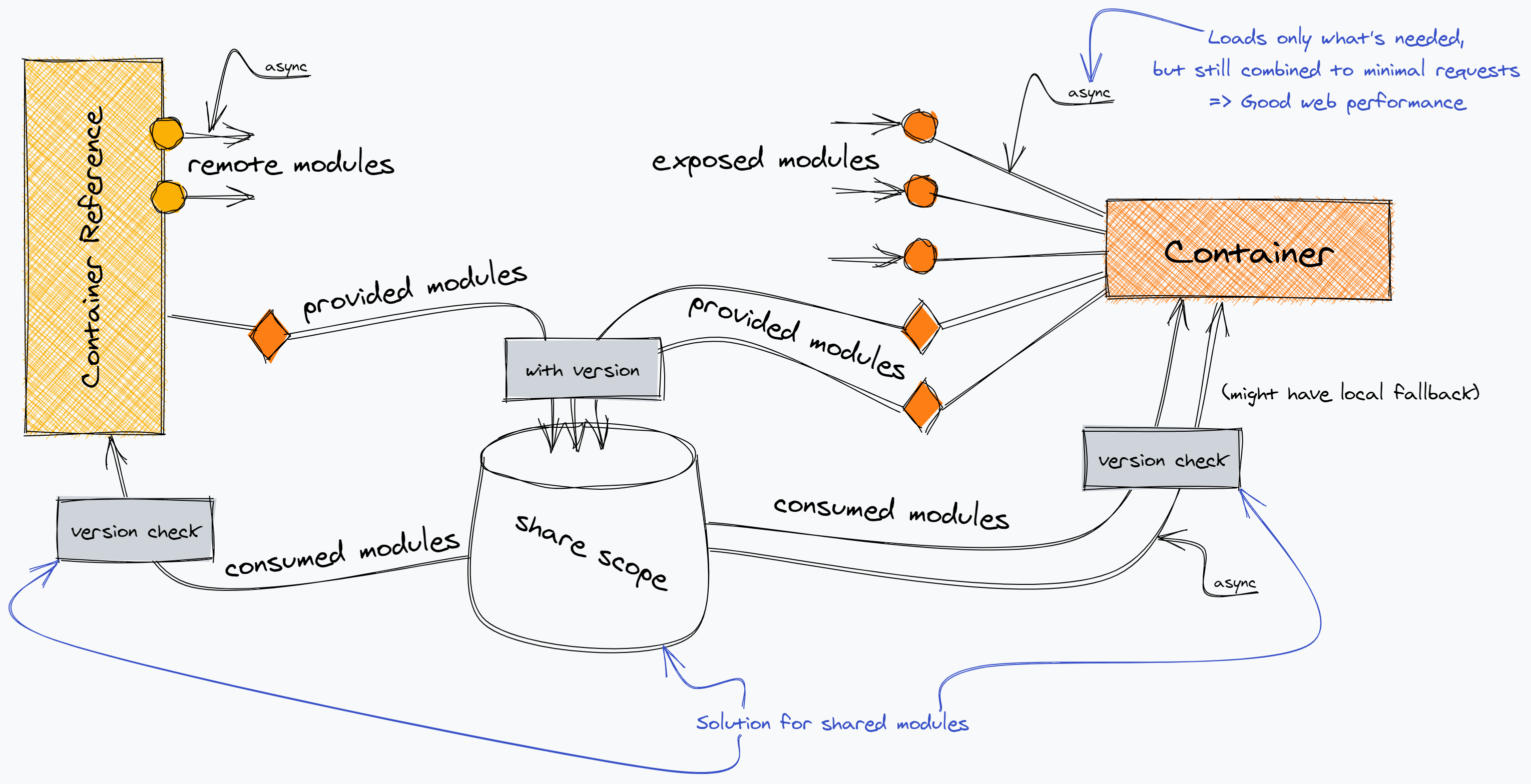
- 使用Module Federation时,每个应用块都是一个独立的构建,这些构建都将编译为容器
- 容器可以被其他应用或者其他容器应用
- 一个被引用的容器被称为
remote, 引用者被称为host,remote暴露模块给host,host则可以使用这些暴露的模块,这些模块被成为remote模块
# 7.3.实战
# 7.3.1 配置参数
| 字段 | 类型 | 含义 |
|---|---|---|
| name | string | 必传值,即输出的模块名,被远程引用时路径为${name}/${expose} |
| library | object | 声明全局变量的方式,name为umd的name |
| filename | string | 构建输出的文件名 |
| remotes | object | 远程引用的应用名及其别名的映射,使用时以key值作为name |
| exposes | object | 被远程引用时可暴露的资源路径及其别名 |
| shared | object | 与其他应用之间可以共享的第三方依赖,使你的代码中不用重复加载同一份依赖 |
# 7.3.2 remote
# 7.3.2.1 remote\webpack.config.js
let path = require("path");
let webpack = require("webpack");
let HtmlWebpackPlugin = require("html-webpack-plugin");
const ModuleFederationPlugin = require("webpack/lib/container/ModuleFederationPlugin");
module.exports = {
    mode: "development",
    entry: "./src/index.js",
    output: {
        publicPath: "http://localhost:3000/",
    },
    devServer: {
        port: 3000
    },
    module: {
        rules: [
            {
                test: /\.jsx?$/,
                use: {
                    loader: 'babel-loader',
                    options: {
                        presets: ["@babel/preset-react"]
                    },
                },
                exclude: /node_modules/,
            },
        ]
    },
    plugins: [
        new HtmlWebpackPlugin({
            template:'./public/index.html'
        }),
        new ModuleFederationPlugin({
            filename: "remoteEntry.js",
            name: "remote",
            exposes: {
                "./NewsList": "./src/NewsList",
            }
          })
    ]
}
1
2
3
4
5
6
7
8
9
10
11
12
13
14
15
16
17
18
19
20
21
22
23
24
25
26
27
28
29
30
31
32
33
34
35
36
37
38
39
40
2
3
4
5
6
7
8
9
10
11
12
13
14
15
16
17
18
19
20
21
22
23
24
25
26
27
28
29
30
31
32
33
34
35
36
37
38
39
40
# 7.3.2.2 remote\src\index.js
remote\src\index.js
import("./bootstrap");
1
# 7.3.2.3 remote\src\bootstrap.js
remote\src\bootstrap.js
import React from "react";
import ReactDOM from "react-dom";
import App from "./App";
ReactDOM.render(<App />, document.getElementById("root"));
1
2
3
4
2
3
4
# 7.3.2.4 remote\src\App.js
remote\src\App.js
import React from "react";
import NewsList from './NewsList';
const App = () => (
  <div>
    <h2>本地组件NewsList</h2>
    <NewsList />
  </div>
);

export default App;
1
2
3
4
5
6
7
8
9
10
2
3
4
5
6
7
8
9
10
# 7.3.2.5 remote\src\NewsList.js
remote\src\NewsList.js
import React from "react";
export default ()=>(
    <div>新闻列表</div>
)
1
2
3
4
2
3
4
# 7.3.3 host
# 7.3.3.1 host\webpack.config.js
host\webpack.config.js
let path = require("path");
let webpack = require("webpack");
let HtmlWebpackPlugin = require("html-webpack-plugin");
const ModuleFederationPlugin = require("webpack/lib/container/ModuleFederationPlugin");
module.exports = {
    mode: "development",
    entry: "./src/index.js",
    output: {
        publicPath: "http://localhost:8000/",
    },
    devServer: {
        port: 8000
    },
    module: {
        rules: [
            {
                test: /\.jsx?$/,
                use: {
                    loader: 'babel-loader',
                    options: {
                        presets: ["@babel/preset-react"]
                    },
                },
                exclude: /node_modules/,
            },
        ]
    },
    plugins: [
        new HtmlWebpackPlugin({
            template: './public/index.html'
        }),
        new ModuleFederationPlugin({
            filename: "remoteEntry.js",
            name: "host",
            remotes: {
                remote: "remote@http://localhost:3000/remoteEntry.js"
            }
        })
    ]
}
1
2
3
4
5
6
7
8
9
10
11
12
13
14
15
16
17
18
19
20
21
22
23
24
25
26
27
28
29
30
31
32
33
34
35
36
37
38
39
40
2
3
4
5
6
7
8
9
10
11
12
13
14
15
16
17
18
19
20
21
22
23
24
25
26
27
28
29
30
31
32
33
34
35
36
37
38
39
40
# 7.3.3.2 host\src\index.js
host\src\index.js
import("./bootstrap");
1
# 7.3.3.3 host\src\bootstrap.js
host\src\bootstrap.js
import React from "react";
import ReactDOM from "react-dom";
import App from "./App";
ReactDOM.render(<App />, document.getElementById("root"));
1
2
3
4
2
3
4
# 7.3.3.4 host\src\App.js
host\src\App.js
import React from "react";
import Slides from './Slides';
const RemoteNewsList = React.lazy(() => import("remote/NewsList"));

const App = () => (
  <div>
    <h2 >本地组件Slides, 远程组件NewsList</h2>
    <Slides />
    <React.Suspense fallback="Loading NewsList">
      <RemoteNewsList />
    </React.Suspense>
  </div>
);
export default App;
1
2
3
4
5
6
7
8
9
10
11
12
13
14
2
3
4
5
6
7
8
9
10
11
12
13
14
# 7.3.3.5 host\src\Slides.js
host\src\Slides.js
import React from "react";
export default ()=>(
    <div>轮播图</div>
)
1
2
3
4
2
3
4
# 7.4.shared
shared配置主要是用来避免项目出现多个公共依赖
# 7.4.1 remote\webpack.config.js
    plugins: [
        new HtmlWebpackPlugin({
            template:'./public/index.html'
        }),
        new ModuleFederationPlugin({
            filename: "remoteEntry.js",
            name: "remote",
            exposes: {
                "./NewsList": "./src/NewsList",
            },
+            shared:{
+                react: { singleton: true },
+                "react-dom": { singleton: true }
+              }
          })
    ]
1
2
3
4
5
6
7
8
9
10
11
12
13
14
15
16
2
3
4
5
6
7
8
9
10
11
12
13
14
15
16
# 7.4.2 host\webpack.config.js
    plugins: [
        new HtmlWebpackPlugin({
            template: './public/index.html'
        }),
        new ModuleFederationPlugin({
            filename: "remoteEntry.js",
            name: "host",
            remotes: {
                remote: "remote@http://localhost:3000/remoteEntry.js"
            },
+           shared:{
+                react: { singleton: true },
+                "react-dom": { singleton: true }
+           }
        })
    ]
1
2
3
4
5
6
7
8
9
10
11
12
13
14
15
16
2
3
4
5
6
7
8
9
10
11
12
13
14
15
16
# 7.5.双向依赖
- Module Federation 的共享可以是双向的
# 7.5.1 remote\webpack.config.js
    plugins: [
        new HtmlWebpackPlugin({
            template:'./public/index.html'
        }),
        new ModuleFederationPlugin({
            filename: "remoteEntry.js",
            name: "remote",
+            remotes: {
+                host: "host@http://localhost:8000/remoteEntry.js"
+            },
            exposes: {
                "./NewsList": "./src/NewsList",
            },
            shared:{
                react: { singleton: true },
                "react-dom": { singleton: true }
              }
          })
    ]
1
2
3
4
5
6
7
8
9
10
11
12
13
14
15
16
17
18
19
2
3
4
5
6
7
8
9
10
11
12
13
14
15
16
17
18
19
# 7.5.2 host\webpack.config.js
    plugins: [
        new HtmlWebpackPlugin({
            template: './public/index.html'
        }),
        new ModuleFederationPlugin({
            filename: "remoteEntry.js",
            name: "host",
            remotes: {
                remote: "remote@http://localhost:3000/remoteEntry.js"
            },
+           exposes: {
+                "./Slides": "./src/Slides",
+           },
            shared:{
                react: { singleton: true },
                "react-dom": { singleton: true }
              }
        })
    ]
1
2
3
4
5
6
7
8
9
10
11
12
13
14
15
16
17
18
19
2
3
4
5
6
7
8
9
10
11
12
13
14
15
16
17
18
19
# 7.5.3 remote\src\App.js
remote\src\App.js
import React from "react";
import NewsList from './NewsList';
+const RemoteSlides = React.lazy(() => import("host/Slides"));
const App = () => (
  <div>
+    <h2>本地组件NewsList,远程组件Slides</h2>
    <NewsList />
+    <React.Suspense fallback="Loading Slides">
+      <RemoteSlides />
+    </React.Suspense>
  </div>
);

export default App;
1
2
3
4
5
6
7
8
9
10
11
12
13
14
2
3
4
5
6
7
8
9
10
11
12
13
14
# 7.6.多个remote
# 7.6.1 all\webpack.config.js
let path = require("path");
let webpack = require("webpack");
let HtmlWebpackPlugin = require("html-webpack-plugin");
const ModuleFederationPlugin = require("webpack/lib/container/ModuleFederationPlugin");
module.exports = {
    mode: "development",
    entry: "./src/index.js",
    output: {
        publicPath: "http://localhost:3000/",
    },
    devServer: {
        port: 5000
    },
    module: {
        rules: [
            {
                test: /\.jsx?$/,
                use: {
                    loader: 'babel-loader',
                    options: {
                        presets: ["@babel/preset-react"]
                    },
                },
                exclude: /node_modules/,
            },
        ]
    },
    plugins: [
        new HtmlWebpackPlugin({
            template:'./public/index.html'
        }),
        new ModuleFederationPlugin({
            filename: "remoteEntry.js",
            name: "all",
            remotes: {
                remote: "remote@http://localhost:3000/remoteEntry.js",
                host: "host@http://localhost:8000/remoteEntry.js",
            },
            shared:{
                react: { singleton: true },
                "react-dom": { singleton: true }
              }
          })
    ]
}
1
2
3
4
5
6
7
8
9
10
11
12
13
14
15
16
17
18
19
20
21
22
23
24
25
26
27
28
29
30
31
32
33
34
35
36
37
38
39
40
41
42
43
44
45
2
3
4
5
6
7
8
9
10
11
12
13
14
15
16
17
18
19
20
21
22
23
24
25
26
27
28
29
30
31
32
33
34
35
36
37
38
39
40
41
42
43
44
45
# 7.6.2 remote\src\index.js
remote\src\index.js
import("./bootstrap");
1
# 7.6.3 remote\src\bootstrap.js
remote\src\bootstrap.js
import React from "react";
import ReactDOM from "react-dom";
import App from "./App";
ReactDOM.render(<App />, document.getElementById("root"));
1
2
3
4
2
3
4
# 7.6.4 remote\src\App.js
remote\src\App.js
import React from "react";
const RemoteSlides = React.lazy(() => import("host/Slides"));
const RemoteNewsList = React.lazy(() => import("remote/NewsList"));
const App = () => (
  <div>
    <h2>远程组件Slides,远程组件NewsList</h2>
    <React.Suspense fallback="Loading Slides">
      <RemoteSlides />
    </React.Suspense>
    <React.Suspense fallback="Loading NewsList">
      <RemoteNewsList />
    </React.Suspense>
  </div>
);

export default App;
1
2
3
4
5
6
7
8
9
10
11
12
13
14
15
16
2
3
4
5
6
7
8
9
10
11
12
13
14
15
16
编辑 (opens new window)
上次更新: 2022/05/23, 15:08:15